
Welcome to issue 11 of the Sheets Insiders membership program.
You can see the full archives here.
As 2024 draws to a close, I thought it would be helpful to recap all the new features that Google announced this year for Google Sheets.
And boy, are there a lot!
I was surprised at how many Connected Sheets/Looker Studio announcements we had. I don’t use these tools regularly though, so don’t keep such a close eye on them. Given how much development happened this year, they’re obviously getting a lot of use by Google’s customers.
Zooming out even further though, the biggest Sheets announcements this year were: the Tables feature, improved calculation speed, Gemini AI in the sidebar (Workspace customers only), and multi-select dropdowns.
2024 In Review for Google Sheets
January
- Connected Sheets: More functions available in Connected Sheets for BigQuery. It now supports 23 functions! (read more)
- Apps Script: Version history limits declared for apps script, up to 200 versions of your script (read more) [Workspace customers only]
- Connected Sheets: Google added new ways to work with filters in Connected Sheets (read more)
February
- Google Sheets: Ability to import and convert sensitive Excel files into Google Sheets with client-side encryption (read more) [Enterprise and Education customers only]
March
- Connected Sheets: Google extended the timeout from 5 minutes to 10 minutes for queries running within Connected Sheets for BigQuery and Looker (read more)
- Google Sheets: Smooth scrolling introduced to make our experience… well, smoother 😎 (read more)
- Google Sheets: Preset dropdowns for easier dropdown creation (read more)
- Google Sheets: Improved filtering for merged cells (but hey, that doesn’t mean you should use them!! Merged cells are ok for presentation but never for data tables 😡) (read more)
April
- Looker Studio: Added the option to create Looker Studio reports directly from Google Sheets (read more)
May
- Google Sheets: Feature to quickly convert ranges of data into dropdown chips in bulk with a prompt to “Convert to dropdown chips” (read more)
- Google Sheets: The BIG ANNOUNCEMENT…. Drumroll please 🥁…
🔥 Tables in Google Sheets 🔥
This amazing new feature brings structure and formatting to datasets (announcement and my tutorial)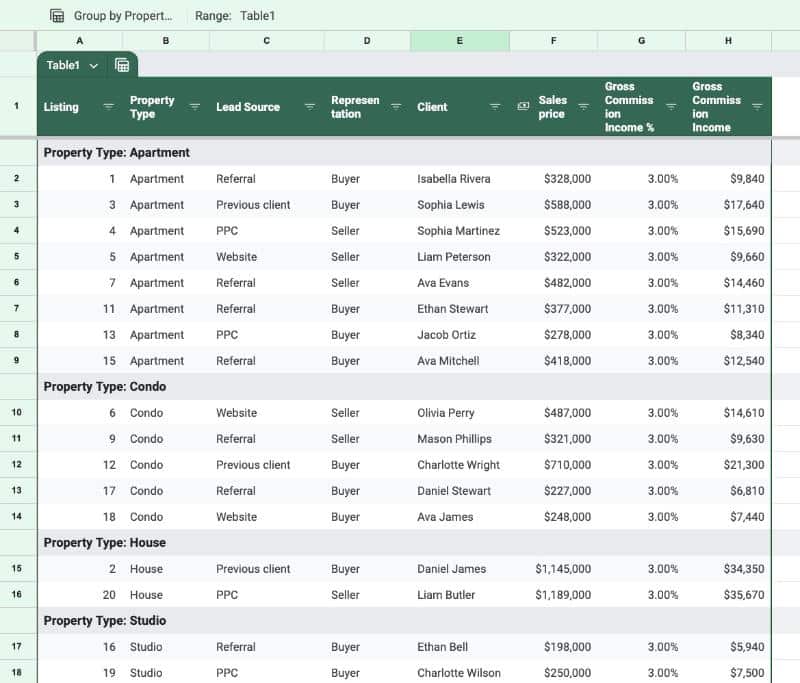
- Connected Sheets: Increased row limits for data returned from BigQuery in to Connected Sheets (read more)
- Google Sheets: Client-side encrypted Excel files now editable in Google Sheets (read more) [Enterprise and Education customers only]
June
- Google Sheets: Google added Conditional Notifications, which allow you to create rules that send emails when certain conditions are met e.g. if this value exceeds a threshold, send an email to the boss (read more) [Workspace customers only]
- Google Sheets: 🤖 Gemini AI is now generally available in the sidebar of Google Sheets (read more) [Workspace customers only]
- Google Sheets: Zoom, zoom! Google DOUBLED the calculation speed of Google Sheets 😍 (read more)
July
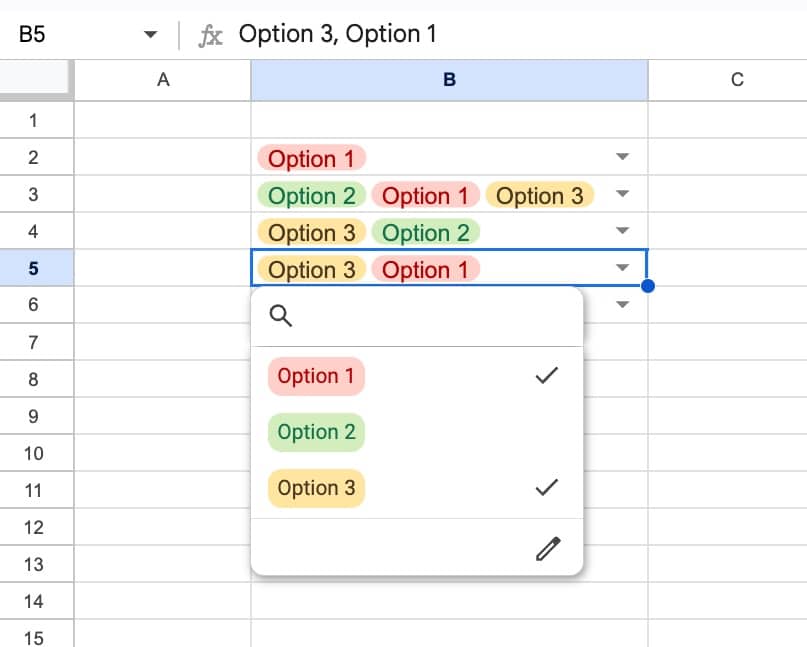
- Google Sheets: Added option for multiple selections in dropdown chips!! 😀 (read more)
- Google Sheets: Controls for admins to restrict which URLs Apps Scripts and Sheets can import external data from (read more) [Workspace customers only]
August
- Apps Script: More granular controls added for Apps Script, to control who can access and execute scripts (read more) [Workspace customers only]
- Google Forms + Sheets: Forms data automatically converted into a Table to benefit from the format and structure of Tables (read more)
- Google Sheets: Upload Google Sheets ito Gemini for insights and analysis (read more) [Workspace customers only]
September
- Connected Sheets: Google added the ability to directly link Connected Sheets to existing Looker queries, rather than having to start from scratch in Sheets (read more)
- Google Sheets: Google Sheets Tables are now integrated with conditional notifications (read more) [Workspace customers only]
- Google Sheets: Gemini can now generate structured tables from prompts in the sidebar (read more) [Workspace customers only]
October
- Google Sheets: Comments and action items now available in client-side encrypted Google Sheets (read more) [Enterprise and Education customers only]
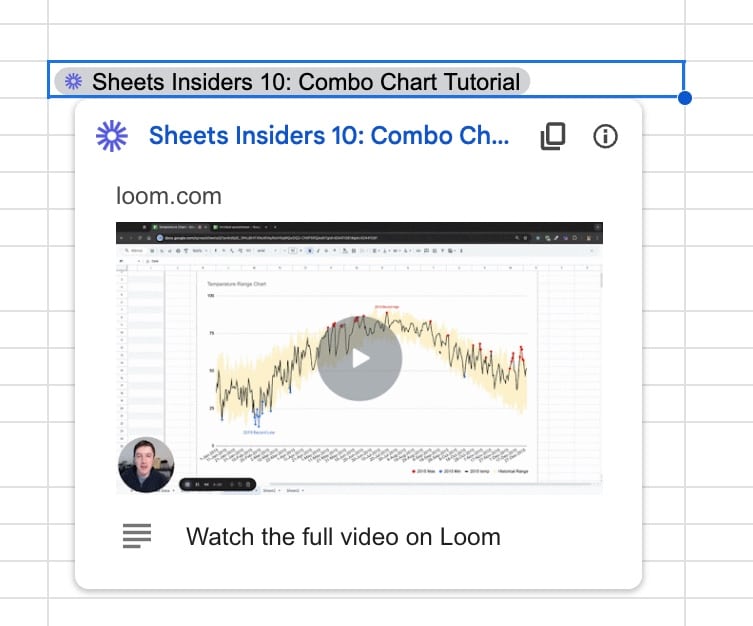
- Google Sheets: Third-party smart chips now available in Google Sheets, which lets you pull rich data from apps, like Loom, directly into Sheets (read more)
November
- Google Sheets: Improved filters in Tables (read more)
- Google Sheets: Seven additional languages added to Gemini in the side panel of Google Sheets: French, German, Italian, Japanese, Korean, Portuguese, and Spanish (read more) [Workspace customers only]
- Connected Sheets: Search for and reuse pre-defined queries from BigQuery in Connected Sheets (read more)
- Google Sheets: Table reference improvements in Google Sheets, including ability to reference multiple columns, headers and footers (read more)
- Connected Sheets: Expanding the row limits in Connected Sheets for Looker to 100,000 (read more)
December
- Google Sheets: Policy visualization is now generally available and gives you insights into security policies such as data loss prevention and trust rules within your Workspace account (read more)
Looking ahead to 2025…
AI. AI. AI.
It’s hard to predict anything other than AI as the main focus for next year.
The Gemini sidebar service will continue to evolve and improve. We’ll interact with our spreadsheets using more natural language prompting. And, I’m sure we’ll get improved data analysis and charting abilities from the Gemini sidebar in our Sheets.
I predict we’ll also see a continued evolution of the smart canvas idea, which aims to make working between Workspace apps, and third-party apps, more seamless.
Whatever happens, the technology landscape is changing faster than ever before. And I’ll do my best to keep you up-to-date on the best practices and AI-infused workflows here inside the membership.