In this post, I want to show you something amazing: how a simple equation — the logistic map — can lead to incredible outcomes, and even to chaos.
And we’ll explore this with Google Sheets so you can follow along (please download the template at end of the post).
But first, we begin our story in a field far, far away, where two bunnies are getting down to, erm, business, shall we say, as they start a fluffle* of rabbits…
* collective noun for wild rabbits

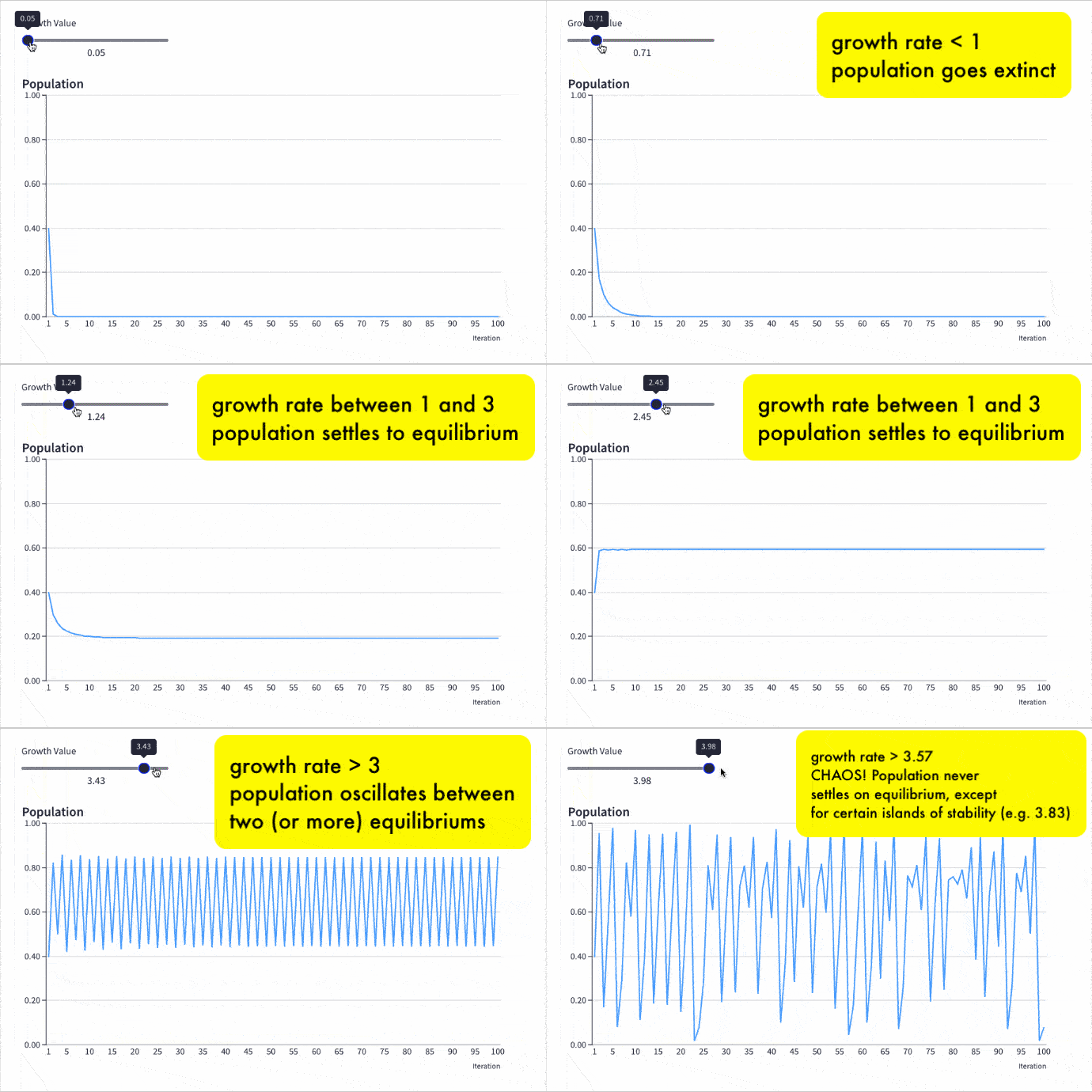
Provided the growth rate is greater than one, the population grows until it becomes constrained by limited resources (for example, food). Then it settles into a stable population, neither increasing nor decreasing year on year.
But as the growth rate increases weird things start happening.
The rabbit population grows faster but it doesn’t settle down to a single equilibrium (stable population) anymore. No. In fact, the population oscillates between two equilibrium values. One year high, one year low, then back to the high value again, then low, and so on, to infinity.
Keep increasing the growth rate, however, and suddenly the population oscillates between four equilibriums. Then eight. Then sixteen.
And if it increases past the specific growth rate of 3.57, well all bets are off the table!
The population becomes chaotic and never settles into any equilibrium at all. It bounces around randomly, some years high, others low, others in the middle, with no pattern.
Except that’s not the end of the story.
Incredibly, within this region of chaotic behavior lie “islands of stability”. Short windows at specific growth rates where order re-establishes itself.
Out of the chaos, a periodic pattern emerges! 🤯
The Logistic Map
Here is the logistic map with a changing growth rate to illustrate how the population changes:
Contents:
- The Logistic Map Equation
- Comparing Populations At Different Growth Rates
- The Bifurcation Diagram
- How To Create The Logistic Map In Google Sheets
- How To Create An Interactive Population Model With Grid
- How To Create The Bifurcation Diagram
- Displaying The Logistic Map Equation In Google Sheets
- Logistic Map Template In Google Sheets
- Further Reading
Continue reading Exploring Population Growth And Chaos Theory With The Logistic Map, In Google Sheets