Running Total Array Formulas Using The MMULT Function

[Editor’s note: This post is from 2017. With the launch of the new SCAN function in 2022, there is a much, much easier way to calculate running totals. Please see the SCAN function post. I’m leaving this here as a reference for the MMULT function.]

In this post we’ll look at how to calculate a running total, using a standard method and an array formula method. We’ll cover the topic of matrix multiplication (take a deep breath, it’s going to be ok!) using the MMULT formula, one of the more exotic, and challenging formulas in Google Sheets.

If you like video tutorials, here’s the one on MMULT:

This is a lesson from my latest, Google Sheets course on Advanced Formulas 30 Day Challenge (it’s free!).

Continue reading Running Total Array Formulas Using The MMULT Function

10 Tips To Build A Google Sheets Budget Template

It probably won’t surprise you to hear that I use a Google Sheets budget template to track my finances, both incomings and outgoing, at home and for my business.

The dashboards available through online banking sites are pretty rudimentary. They don’t give much insight into what’s happening with my finances, particularly over longer time frames.

I like using Google Sheets, as opposed to another third party service like Mint, because it’s fully customizable. It’s easy to use and I can share any spending or budget templates easily with my wife.
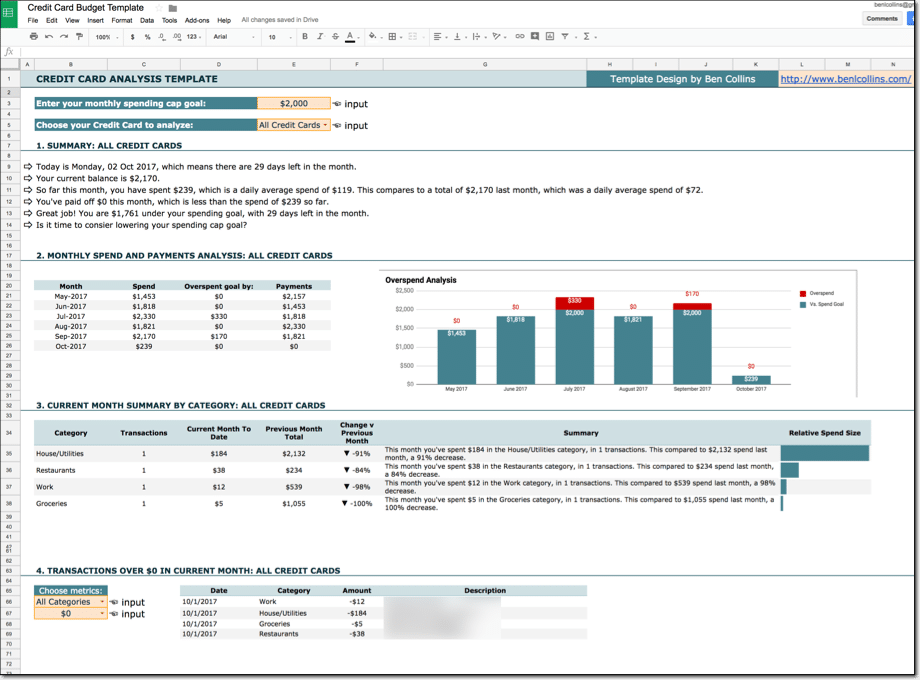
Google Sheets budget template with Tiller

I’m not a financial expert, so I won’t be dispensing any financial advice here. I won’t opine on what you should or shouldn’t show in your spending and budget templates in this post, nor will I talk about what your financial goals should be or how to get there.

What I will do in this post however, is show you some useful tips in Google Sheets that you can use for building your own budget templates. Techniques to make them more insightful and more helpful for reaching your goals.

Continue reading 10 Tips To Build A Google Sheets Budget Template

Community Connectors: Access all your data in Google Data Studio

Data Studio is relatively new dashboard tool from Google, launched in mid-2016. It’s a superb tool for creating professional looking reports, easily and quickly, and it connects seamlessly to other Google data sources (e.g. Analytics, AdSense, Sheets, …).

Here’s an introduction to Data Studio and a look at the more advanced features.

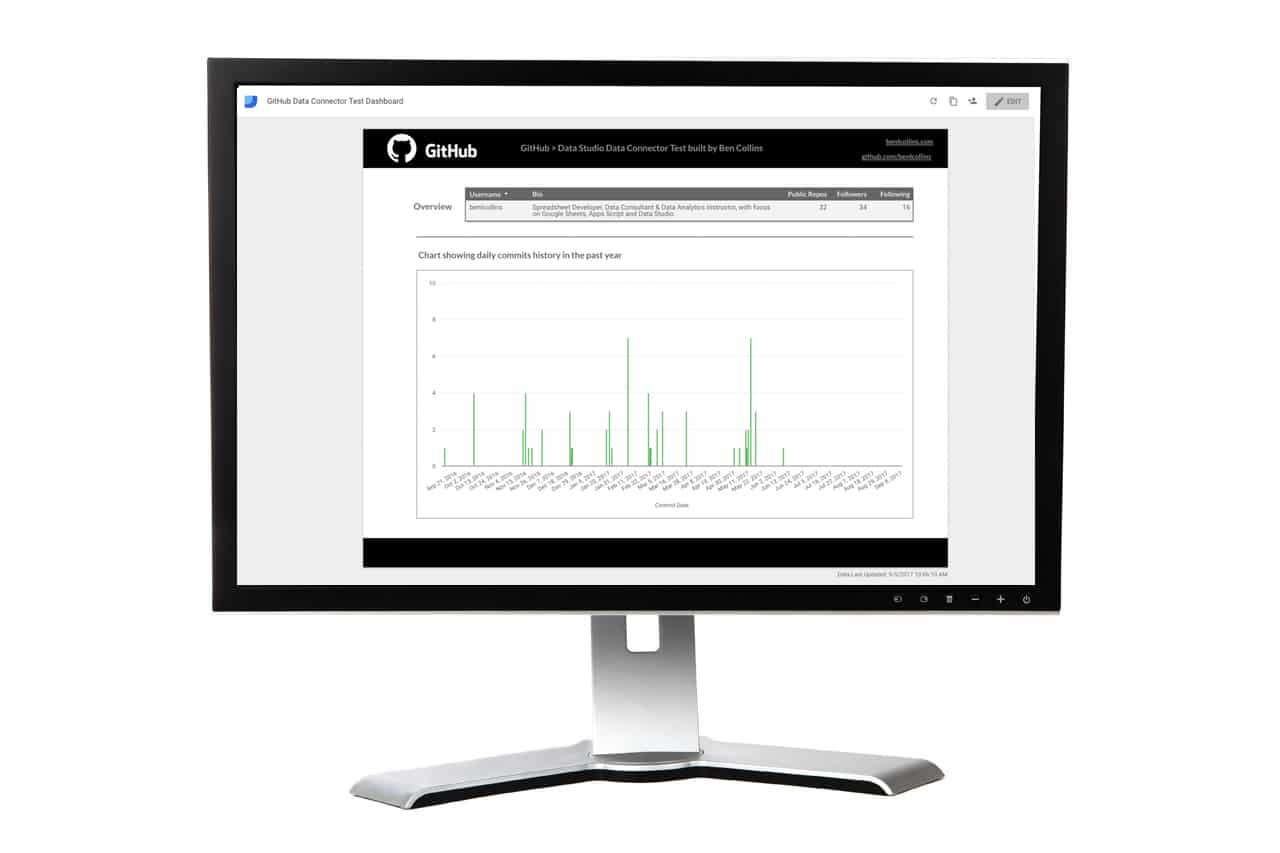
GitHub commit dashboard, built with the new native data Community Connector
GitHub commits dashboard, built in Data Studio using a native Data Connector

Do you work with data outside of Google’s ecosystem though?

I’ll go out on a limb here, and say, yes, most likely you do.

Perhaps you’re a digital marketing analyst looking at Facebook, Twitter, Instagram, MailChimp data (etc…) for example.

Many of us work with other web services and you want that data displayed in Data Studio. With the launch of native data Community Connectors, you can connect to your favorite web services and access data that lives outside the Google ecosystem directly!

What is a Data Studio Community Connector?

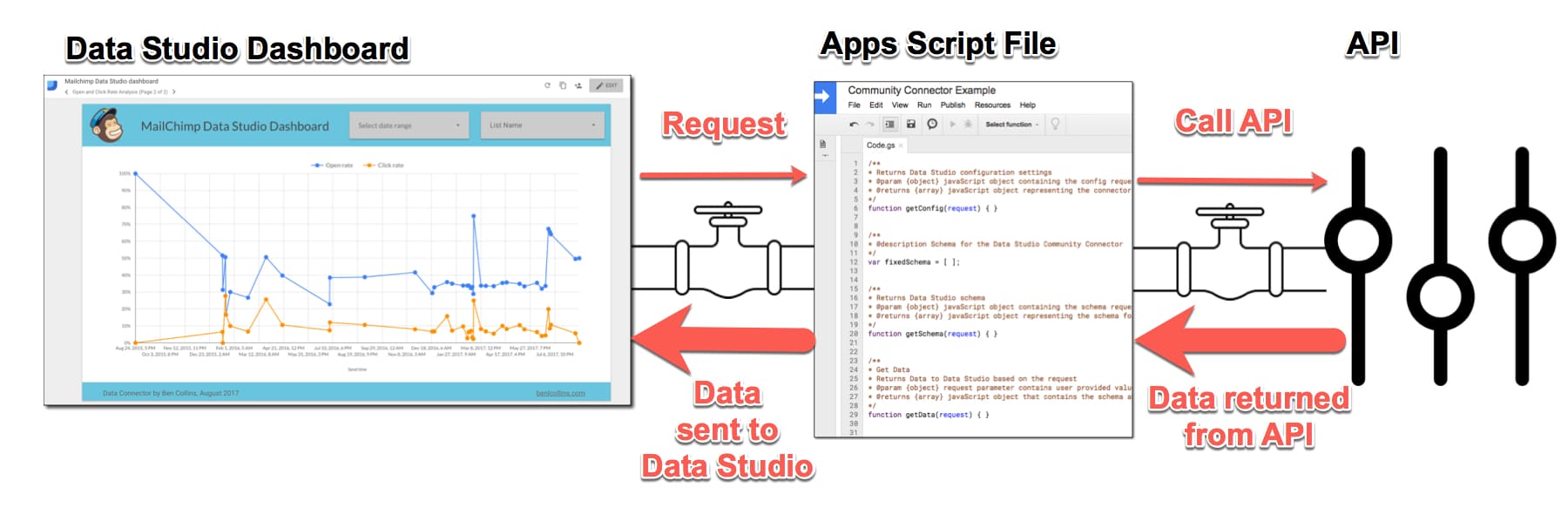
Data Studio Community Connector example
Data Studio Community Connector example with the MailChimp API (click to enlarge)
Continue reading Community Connectors: Access all your data in Google Data Studio

Show data from the GitHub API in Google Sheets, using Apps Script and Oauth

This post shows you how to connect a Google Sheet to GitHub’s API, with Oauth and Apps Script. The goal is to retrieve data and information from GitHub and show it in your Google Sheet, for further analysis and visualization.

If you manage a development team or you’re a technical project manager, then this could be a really useful way of analyzing and visualizing your team’s or project’s coding statistics against goals, such as number of commits, languages, people involved etc. over time.

Contents

  1. What are Git and GitHub?
  2. Access GitHub API using Basic Authentication
  3. Access GitHub API using OAuth2 Authentication
  4. Resources and further reading

Note, this is not a post about integrating your Apps Script environment with GitHub to push/pull your code to GitHub. That’s an entirely different process, covered in detail here by Google Developer Expert Martin Hawksey.

Continue reading Show data from the GitHub API in Google Sheets, using Apps Script and Oauth

How to add a total row to a Query Function table in Google Sheets

This article looks at how to add a total row to tables generated using the Query function in Google Sheets. It’s an interesting use case for array formulas, using the {...} notation, rather than the ArrayFormula notation.

So what the heck does this all mean?

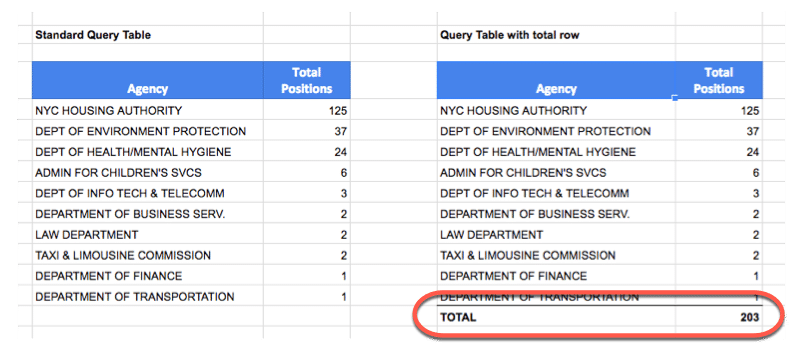
It means we’re going to see how to add a total row like this:

How to add a total row to a Google Sheets QUERY table
Table on the left without a total row; Table on the right showing a total row added

using an array formula of this form:

= { QUERY ; { "TOTAL" , SUM(range) } }

Continue reading How to add a total row to a Query Function table in Google Sheets